

Windows 11 is now able to quickly retrieve photos and screenshots from mobile devices with the latest update for Insiders on the Dev channel. Learn how to enable this feature on your PC if you have the trial version of the operating system.
Windows 11 now provides immediate notifications for photos captured on mobile devices.
Microsoft is gradually rolling out a new feature for Windows 11 PCs that allows users to quickly access photos and screenshots from their mobile phones. This feature will make it simpler to edit photos and screenshots from Android smartphones, as users will receive notifications on their computers when new photos or screenshots are taken on their mobile devices.
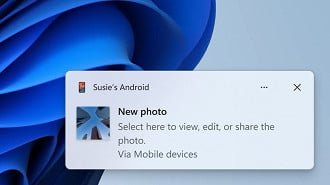
To access the new feature, navigate to Settings > Bluetooth and devices > Mobile devices and select “Manage devices” to authorize an Android smartphone to connect to the computer. The Cross Device Experience Host in the Microsoft Store will need to be updated for the feature to work properly.
Microsoft states that the new feature replaces the previous remote capture function of the “Phone Link” app, which was introduced in September.
Introduction and release dates
The instant notification function for photos and screenshots taken with Android mobile phones is now included in the latest update for Windows 11 on the Dev channel, but its availability for the stable Windows 11 channel is still uncertain.

